What sets Perlecta apart isn't what it reads — it's that it tells you what it couldn't read.
Most apps fill in the cells they are unsure about too, and you have no way of knowing which values are real and which were invented. Perlecta marks the cells it doubts, so you only have to look at those.
For Android phones. Start free: 5 introductory scans, then 1 scan a day for 7 days.
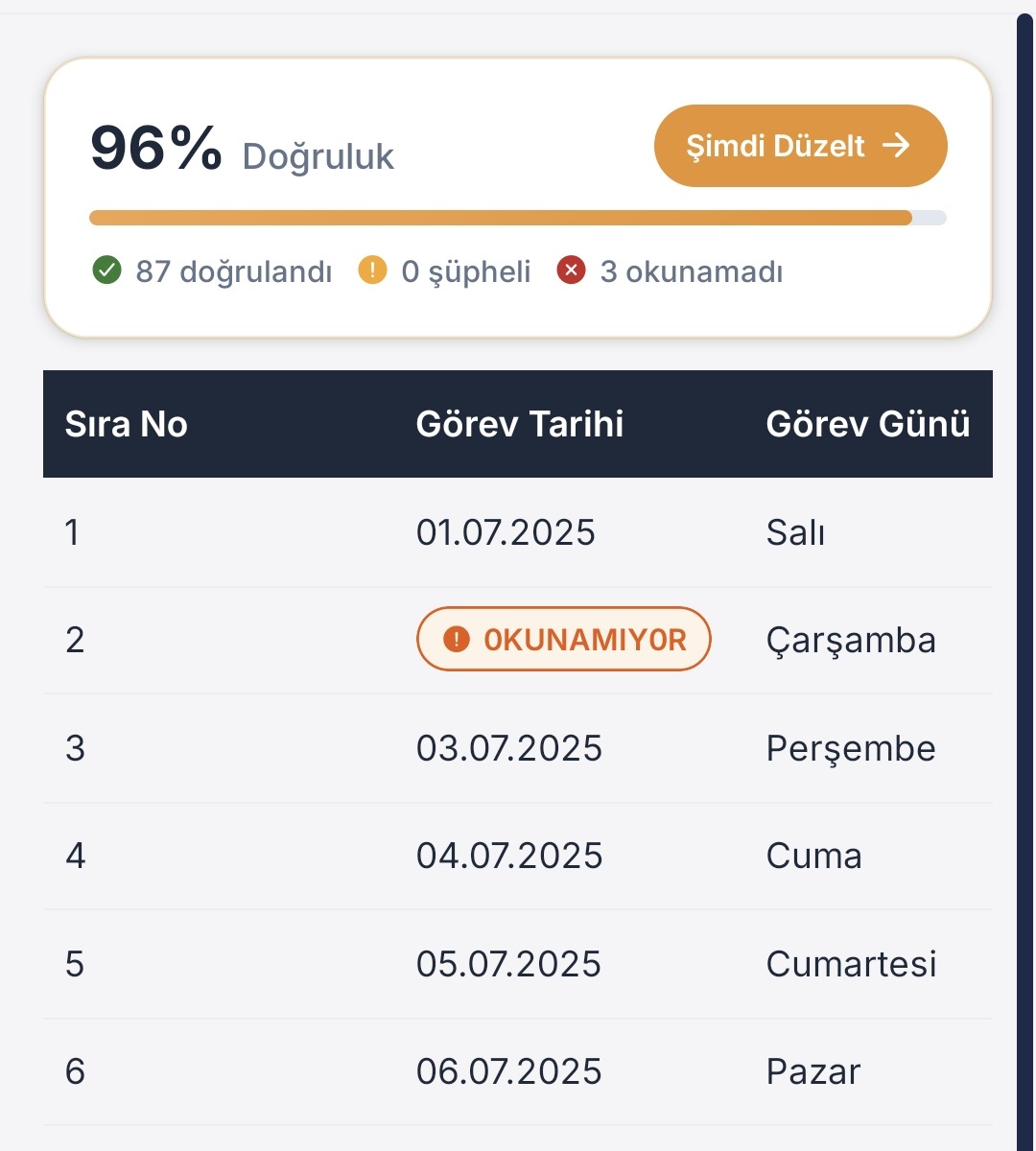
Every scan comes with its own report. In this document 87 cells were verified and 3 could not be read — and the unreadable ones are marked in the table.
Tap a cell that couldn't be read and the app frames that exact spot in the photo of your document. If it's right you confirm it; if not, you type it in.
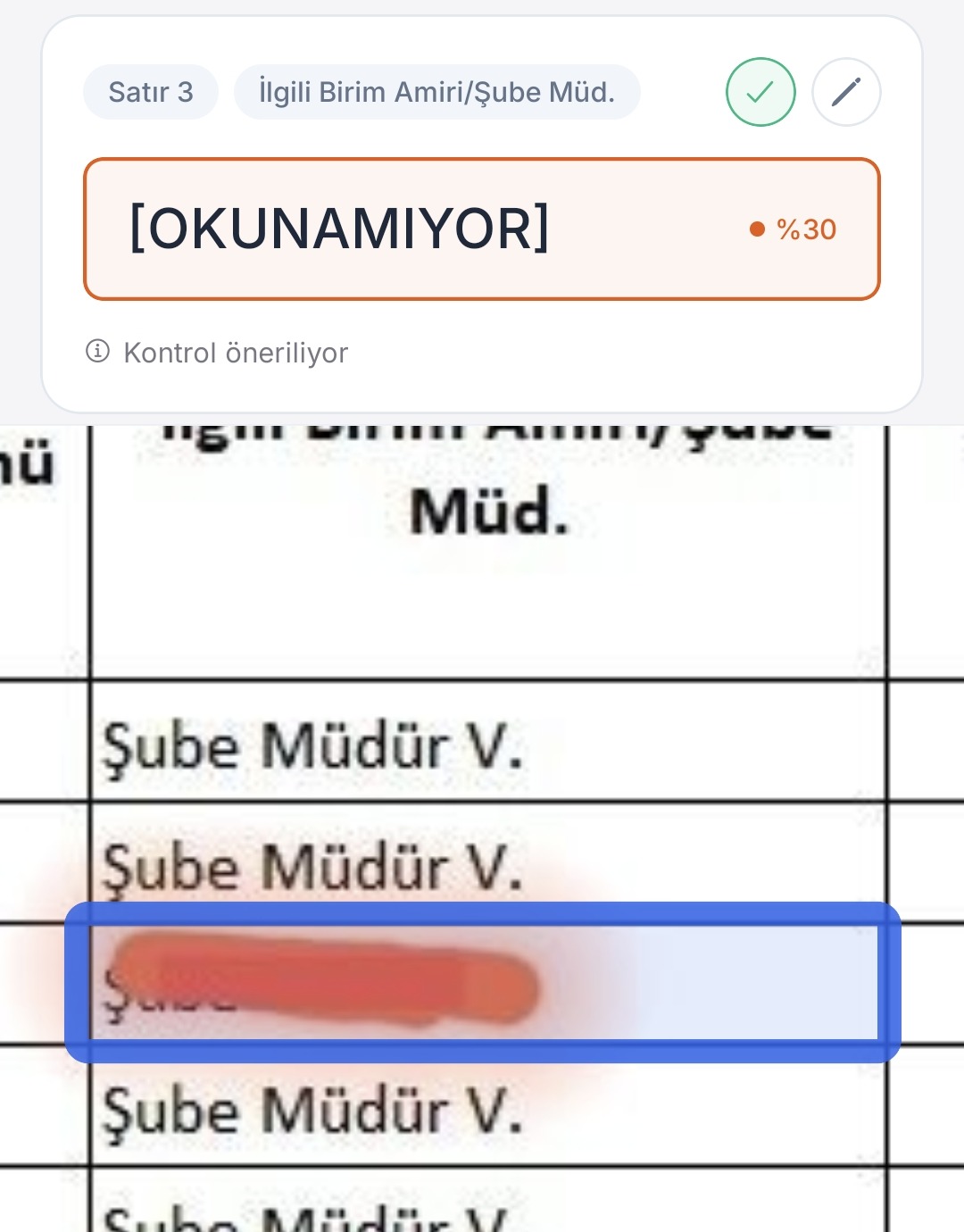
The cell's identity and confidence on top, its place on the paper below. (App screens are shown in Turkish, the launch market.)
| Code | Item | Qty | Unit price |
|---|---|---|---|
| IN0009 | Cable trunking 40×60 | 120 | 18.50 |
| IN0010 | Terminal block 6 mm² | 48 | 4.20 |
| IN0011 | Junction box lid | 36 | 2.75 |
| IN0012 | Circuit breaker C16 | 90 | unreadable |
| IN0013 | Trunking connector | 15 | 7.90 |
What you get is a real .xlsx file — click the cells, write formulas.
Because you notice the empty one. You don't notice the invented one.
They fill in the parts they aren't sure about as well. The table looks spotless, but you have no idea how many invented values are sitting inside it. In the end you check the whole thing by hand — and then the app was pointless.
Cells it doubts are marked amber; cells it could not read at all are marked red. You only look at the marked ones. A five-minute check becomes five seconds — and you know which data you can trust.
An invoice, a bank statement, a stock list, a timesheet, an inventory form… Your phone camera is enough, no scanner needed. You can also pick an existing photo or a PDF.
Tap an uncertain cell and the app zooms straight to that spot in the original photo. You never have to pick the paper back up and count rows.
The output is a real spreadsheet file (.xlsx): clickable cells, working formulas, fully editable. You can also export as Word, PDF or plain text.
Rows, columns and merged headers come across the way they are on paper. The layout holds and cells don't bleed into each other.
Tap a flagged cell and the app shows you where on the paper it was looking. You look, confirm if it's right, correct it if it isn't.
Totals, tax lines and the seller's tax number are checked against each other; anything
that doesn't add up is flagged. When the invoice carries an official QR code, it is also
decoded and compared with the printed amounts — if a field has been rubbed out, the QR
value is offered to you as a suggestion; applying it is your call.
QR codes are read on invoices from Türkiye, Portugal, Spain, Mexico,
Argentina, Colombia, Chile, Peru, Uruguay, Paraguay, the Dominican Republic, India and
Switzerland, and on till receipts from Germany and Austria. Everything is checked on the
document itself; we do not connect to any government system.
A receipt, plain text or a free-form note — it turns a document that isn't a table into an editable one.
Say "move the date column to the front" and the table rearranges itself. No dragging columns around by hand.
Save the result straight to Drive and open it in Sheets or Docs right away.
Perlecta only ever touches the files it creates in your Drive —
it cannot see the rest of your files.
On these three plans your document is read by the same engine, so a cheaper plan does not mean a weaker reading. Ultra goes further: every table is read by two independent engines and the two readings are compared character by character.
| Feature | Free | Starter | Pro | Ultra |
|---|---|---|---|---|
| Scans per month | 5 + 7 days × 1 | 100 | 225 | 500 |
| Active templates | 1 | 3 | 10 | Unlimited |
| Pages in one batch | 1 | 1 | 10 | 50 |
| Excel · Word · PDF · text | ✓ | ✓ | ✓ | ✓ |
| Doubtful cell shown on the photo | ✓ | ✓ | ✓ | ✓ |
| Confidence colors in Word documents | — | — | ✓ | ✓ |
| Invoice cross-check (official QR code) | — | — | ✓ | ✓ |
| Smart Table Builder | — | — | ✓ | ✓ |
| Voice / written editing | — | — | ✓ | ✓ |
| Save to Google Drive | — | — | ✓ | ✓ |
| Ready-made template catalogue | — | — | ✓ | ✓ |
| Reading quality | Same | Same | Same | Two engines + referee |
And we don't hide it. The most valuable thing a scanning app can tell you is where it struggles.
Printed tables with ruled lines, photographed straight on. This is our core job and what we have focused on.
Handwriting, heavily skewed shots, or tables without ruled lines. More cells get flagged as "check this" — we would rather ask you than hand you a wrong value.
Wherever you see "99% accurate", ask which document that number was measured on. Our promise is different: when we aren't sure, we don't stay quiet — we flag it.
Your documents are sent to our server to be processed, and the result is delivered back to you when processing finishes. What is kept, for how long, who it is shared with and how you can have it deleted is written out item by item in our Privacy Policy — not in vague generalities.
You can have your account and your data deleted at any time: account and data deletion.
No. Your phone camera is enough. If you already have a photo or a PDF, you can use that instead.
Yes. The output is a real .xlsx file; it opens and can be edited in Microsoft Excel, Google Sheets, LibreOffice and similar programs.
You can try, but don't expect printed-document quality. With handwriting more cells get flagged as "check this". That is deliberate: we do not write down a value we aren't sure about as if it were correct.
No. We check the totals and tax lines against each other and — when the invoice carries an official QR code — decode it from the photo and compare it with what is printed on the paper; we do not connect to any government system. So we cannot answer the question "does this invoice exist in official records", and we don't claim to.
Two things, and only these. Signing in gives us your name, email address and profile picture. Saving to Drive uses the per-file permission, which means Perlecta can only see and manage the files it creates itself — the rest of your Drive stays invisible to us.
From Google Play → Subscriptions, at any time. Your access continues until the end of the period you have paid for.
info@perlecta.com — a real person answers.

Perlecta is live on Google Play. Download it to try it, or just write to us if you want to ask something — a real person answers.